Commands
Core CLI commands and patterns.
Core
arctic
Launch the TUI (default command).
arctic run
Run a single prompt (headless).
arctic run "Summarize this repo"
arctic run -f ./src/index.ts "Review this file"
Options:
--command <name>run a named command template--model <provider/model>force a model--agent <name>pick an agent--continueor--session <id>resume a session--format jsonstream raw events-f, --fileattach files or directories
arctic models
List available models, optionally by provider:
arctic models
arctic models openai --verbose
arctic models --refresh
Use --refresh to fetch the latest models from providers.
arctic auth
Manage credentials:
arctic auth login
arctic auth list
arctic auth logout
arctic agent
Create or list agents:
arctic agent create
arctic agent list
arctic session
Manage sessions:
arctic session list
arctic session fork <session-id>
arctic export / arctic import
arctic export <sessionId>
arctic import <file-or-url>
arctic stats
Show comprehensive token usage and cost statistics across your sessions with a visual GitHub-style activity heatmap.
arctic stats
arctic stats --view overview
arctic stats --view models
arctic stats --view cost
arctic stats --json

# Filter by date
arctic stats --date today
arctic stats --date yesterday
arctic stats -d 2025-01-15

# Filter by date range
arctic stats --from 2025-01-01 --to 2025-01-15
arctic stats --from 2025-01-01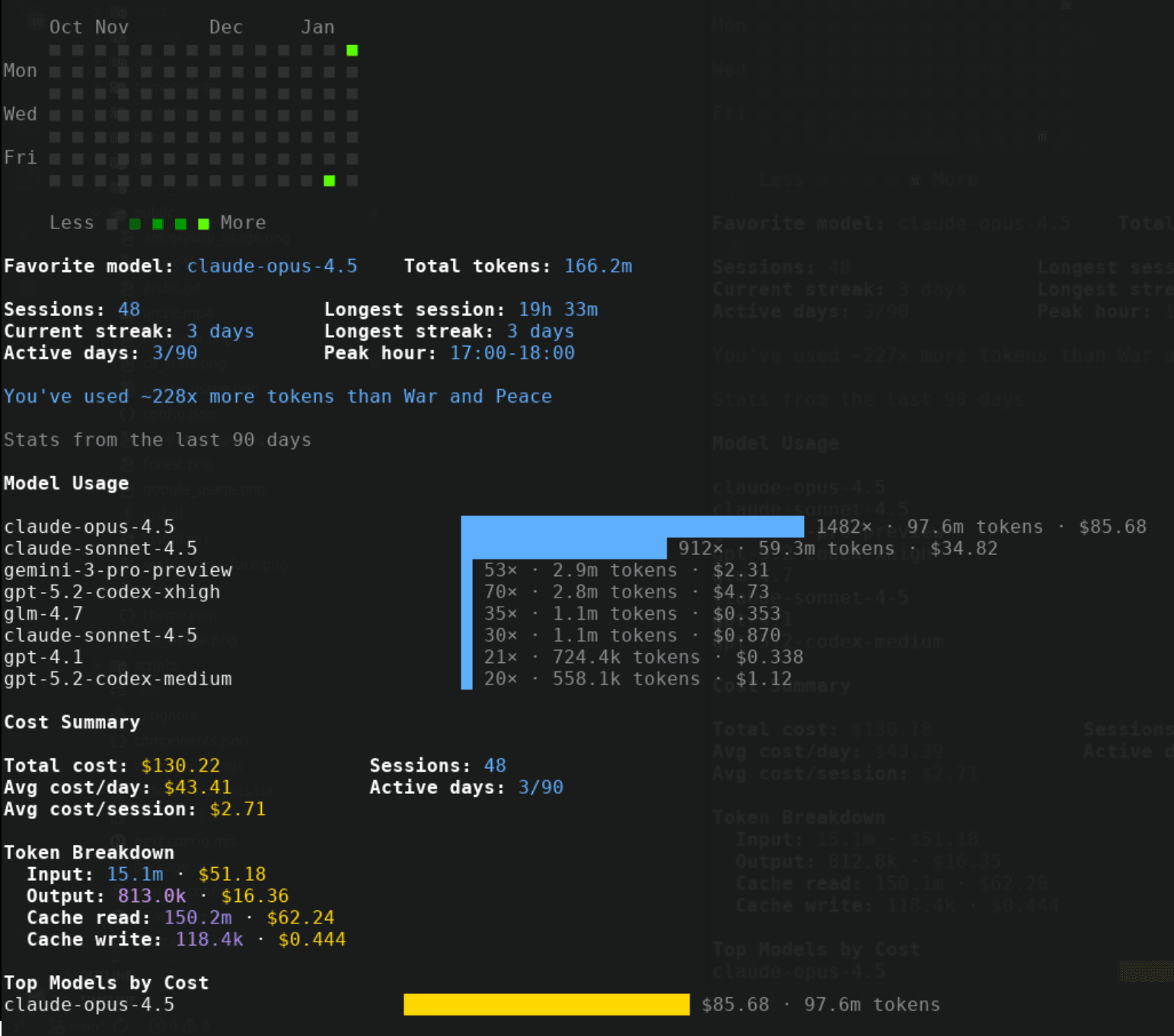
Options:
--view <all|overview|models|cost>: Which section to display (default: all)--json: Output raw stats as JSON--date, -d <date>: Filter by specific date (today,yesterday, orYYYY-MM-DD)--from <date>: Start date for range filter (YYYY-MM-DD)--to <date>: End date for range filter (YYYY-MM-DD)
Output includes:
- Activity Heatmap: GitHub-style contribution graph showing your coding activity over time
- Overview: Favorite model, total tokens, sessions, streaks, active days, peak coding hour
- Model Usage: Visual bars showing token usage per model with costs
- Cost Summary: Total cost, average cost per day/session, token breakdown (input/output/cache read/write) with individual costs
- Top Models by Cost: Models ranked by spending with visual cost bars
- War and Peace comparison: Fun metric showing how many times your token usage exceeds the famous novel (~730k tokens)
arctic mcp
Manage MCP servers:
arctic mcp list
arctic mcp add
arctic mcp auth
arctic mcp logout
arctic debug
Low‑level debug tooling:
arctic debug config
arctic debug file read <path>
arctic debug snapshot diff <hash>
Slash Commands (TUI)
In the TUI, you can use slash commands for quick actions. Type / in the input to see autocomplete suggestions.
Built-in slash commands
/status- Show system status/usage- View usage and rate limits/stats- View activity heatmap and statistics/models- Model picker/agents- Agent picker/session- Session list/new- New session/mcp- MCP server status/theme- Theme picker/undo- Undo last message/redo- Redo message/compact- Compact session history/rename- Rename session/copy- Copy session/export- Export session/timeline- View session timeline/thinking- Toggle thinking mode/benchmark- Run benchmark/connect- Connect to provider/help- Show help/commands- List all commands/exit- Exit Arctic
Custom commands (defined in .arctic/command/) also appear in slash command autocomplete.
Custom Commands
Commands are defined as markdown templates in:
- Project:
.arctic/command/*.md - Global:
~/.config/arctic/command/*.md
Each command file uses frontmatter:
---
description: "Review changes"
model: "provider/model"
agent: "build"
subtask: true
---

Review the following changes:
{{diff}}
Invoke with:
arctic run --command reviewOr in the TUI with /review.
Import from Claude Code
Arctic can import commands from Claude Code on first launch:
- Project commands:
.claude/commands/→.arctic/command/claude/ - Global commands:
~/.claude/commands/→~/.config/arctic/command/claude/
You'll be prompted once. Imported commands work immediately as slash commands in the TUI.